


B. Application Documents (Prescribed Forms)
Please participate in the promotion seminars provided by JICE.
For details about the seminar schedule, please check the "Application" page on this website and our Facebook page.
Refer to Application Eligibility on JDS website and make sure to prepare all the required documents in appropriate file format.
| Doc No | Application Documents | File Type | Remarks |
|---|---|---|---|
| 1. | Short Essays | PDF (One file only) |
* Prescribed form - Short essays on "Responsibilities of your work," "Reason for applying the Graduate School," and "Future Contribution" |
| 2. | Research Plan | PDF (One file only) |
* Prescribed form Outline of the research topic, objectives, and expected outcomes |
| 3. | Color ID Photo | JPG, JPEG, PNG, GIF |
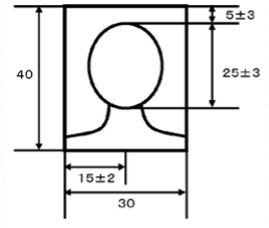 |
| 4. | University Diploma / Certificate of degree |
PDF (One file only for each university) |
-Certificates and academic transcripts for all university degrees and diplomas obtained -Notarized copies of the original documents - Accompanied with an official English translation if not in English |
| 5. | Academic record of university |
||
| 6. | Reference Letter | PDF (One file only) |
* Prescribed form - Must be issued by the direct supervisor at the workplace. - Written in English or accompanied with official English translation if not written in English - JICE may contact your referee for verification. |
| 7. | Employment certificate | PDF (One file only) |
* Prescribed form - This certificate must be issued and authorized by Personnel Department of the applicant's workplace |
| 8. | Approval Letter | PDF (One file only) |
* Prescribed form - The letter must be signed and authorized by the Director General of the applicant's department |
| 9. | Contract (Despacho de Nomeação definitive) | PDF (One file only) |
-To confirm if the applicant is a Permanent civil servant |
| 10. | Performance Evaluation (Avaliação de Desempenho) |
PDF (One file only) |
- This document will not be sent to the university. - For the current two years (2024 and 2025) - Applicants must have a rating of "Good (Bom)" or higher in their Performance Evaluation. |
| 11. | Personal Identification | PDF (One file only) |
- National ID card - Passport (If available, with a copy of passport photo page) |
| 12. | [If any] IELTS Certificate |
PDF (One file only) |
Must be valid until 31 May 2027 (exam taken on/after 1 June 2025) |
| 13. | [If any] Reason Letter |
PDF (One file only) |
- If there is incorrect information on the applicant's certificate, such as misspelling a date of birth, or a name that differs from the passport |
NOTE: Permission Letter * Prescribed form
- The letter must be signed and authorized by a designated official who has the authority to nominate an applicant for a specific position at applicant's workplace. (e.g. The head of the organization or HR department
- It should be addressed to the "Minister of Ministry of State Administration and Public Service," with a copy (cc) to the "Institute of Scholarship, Public Institute"
*The Permission Letter is required only for applicants who pass the second selection.
Please submit it before the 3rd selection.
Complete your application by filling out the necessary information and uploading the required documents.
Deadline for Application: 4:00 p.m. December 15 (Tue), 2026
 )) immediately, and make sure to complete your application before the deadline.
